
GCodePrintr lite - 3D Printing1.41 - Google Play
You'll be able to see results in few seconds.
Publisher Description
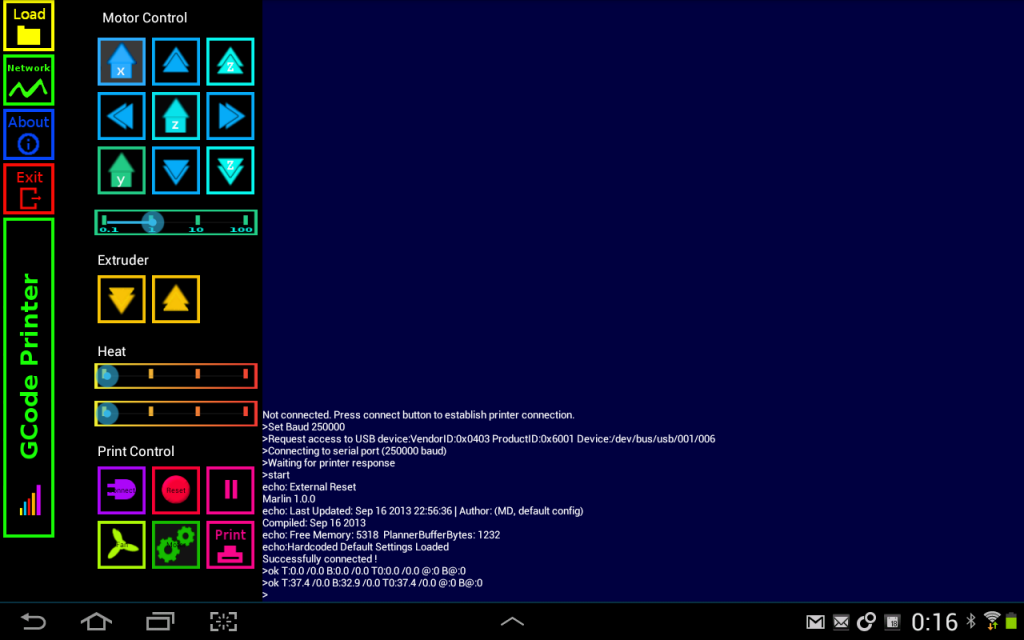
Control your 3D printer from your favourite Android device and send gcodes to the printer.
This is a version of GcodePrintr with a reduced feature set. it allows you to control a real 3D printer using USB-OTG cable but without any visualization and simulation of the print.
********************
It is recommended to install the full version (GCodePrintr) and only use this lite version if the visualization part causes problems. Mainly on devices which are not powerful enough to do printing and visualization at the same time.
*******************
This version offers full printing support (without any visualization of the print)
This is basically GcodePrintr without the Simulation & Visualization part.
IMPORTANT: Before buying this version make sure that your printer connection works with the free version.
Print Features
----------------------
Connect to a printer using USB OTG Cable.
IMPORTANT: Before buying this version make sure that your printer works with the free version.
Control the printer using the Printer Control Panel (X,Y,Z Movement, Extruder, Heat, Fan,..)
Load your own gcode file and start a real print from your Android device.
It has a build-in network receiver which is enabled by long-pressing the "load" button. Once enabled it listens for gcode files in port 53232 . Use Gcode Simulator for PC to send files from PC directly to your Android tablet to print them.
Feedback by console based output.
Does not include simulation and visualization, please buy the GCode Simulator & Printer App if this is needed.
Remarks and Limitations
-----------------------------------
Developed for reprap printers but should work with other printers (e.g. ultimaker) as well, tested with Slic3r and Skeinforge generated Gcodes.
To load files locally from the device, sd-card or dropbox you need to install a Android file manager (e.g. ES File Explorer)
Only absolut positioning is supported. Gcodes with relative positioning will likely fail.
Loading large Gcode files (multiple MegaByte) might fail, depending on the available memory of the device.
Printer Control Feature requires a android device with USB-OTG support and a USB-OTG cable.
Before buying this version make sure that your printer works with the free version.
About GCodePrintr lite - 3D Printing
The company that develops GCodePrintr lite - 3D Printing is MDCode. The latest version released by its developer is 1.41.
To install GCodePrintr lite - 3D Printing on your Android device, just click the green Continue To App button above to start the installation process. The app is listed on our website since 2014-01-12 and was downloaded 0 times. We have already checked if the download link is safe, however for your own protection we recommend that you scan the downloaded app with your antivirus. Your antivirus may detect the GCodePrintr lite - 3D Printing as malware as malware if the download link to de.dietzm.gcodeprinter is broken.
How to install GCodePrintr lite - 3D Printing on your Android device:
- Click on the Continue To App button on our website. This will redirect you to Google Play.
- Once the GCodePrintr lite - 3D Printing is shown in the Google Play listing of your Android device, you can start its download and installation. Tap on the Install button located below the search bar and to the right of the app icon.
- A pop-up window with the permissions required by GCodePrintr lite - 3D Printing will be shown. Click on Accept to continue the process.
- GCodePrintr lite - 3D Printing will be downloaded onto your device, displaying a progress. Once the download completes, the installation will start and you'll get a notification after the installation is finished.
Program Details
System requirements
Download information
Pricing
Version History
version 1.41
posted on 2014-01-12
version 1.41
posted on 2014-01-12
V1.37,New status bar,Support VendorID 0x03eb (Robo3D),Send custom gcodes,Fixed "unknown" gcodes bug,Fixed Google Drive bug,Debug status (press pause in debug mode),Comm. timeout option,Flip X/Y option.,Experimental:,Increase memory on load,Set speed factor override(M220),IMPORTANT: Before buying this version make sure that your printer works with the free version.,This is basically GCode Simulator & Printer without the Simulation & Visualization part.
Disclaimer
Official Google Play Link
We do not host GCodePrintr lite - 3D Printing on our servers. We did not scan it for viruses, adware, spyware or other type of malware. This app is hosted by Google and passed their terms and conditions to be listed there. We recommend caution when installing it.
The Google Play link for GCodePrintr lite - 3D Printing is provided to you by apps112.com without any warranties, representations or guarantees of any kind, so access it at your own risk.
If you have questions regarding this particular app contact the publisher directly. For questions about the functionalities of apps112.com contact us.
